
Questions & Answers
-
My battery is previously connected in the app, but now it says disconnected.
Asked by Dominic R. in Delaware

ODIN
TECH GOD!Official AnswerPlease attempt to fully close the Norsk Guardian app. This can be done on iPhone by swiping up from the bottom of your screen until your app tabs pop up, simply swipe upwards on the app tab, and then re-launch the Norsk Guardian App. This can be done on Android by clicking the three vertical lines on the bottom left of your home-screen and swiping the Norsk Guardian App upwards.
If this does not work, delete the battery from your app, and attempt to re-add the battery.
If both previous steps do not work, delete the Norsk Guardian app and re-install.
Answered by Odin
TECH GOD!
-
Why am I not receiving the confirmation email for the Norsk Guardian App sign-in?
Asked by Caleb B. in Indiana
ODIN
TECH GOD!Official AnswerIf you are not receiving your confirmation email for the Guardian App, please check your spam and junk folders.
Answered by Odin
TECH GOD!
-
My battery won’t connect to the app.
Asked by Oscar W. in Michigan
ODIN
TECH GOD!Official AnswerMake sure to charge your battery before connecting to the app.
Attempt to fully close the Norsk Guardian App. This can be done on iPhone by swiping up from the bottom of your screen until your app tabs pop up, simply swipe upwards on the app tab, and then re-launch the Norsk Guardian App.
This can be done on Android by clicking the three vertical lines on the bottom left of your home-screen and swiping the Norsk Guardian App upwards.
Answered by Odin
TECH GOD!
-
How do I connect a battery to the Norsk Lithium Guardian App?
Asked by Justin M. in South Dakota
ODIN
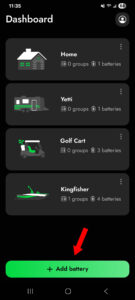
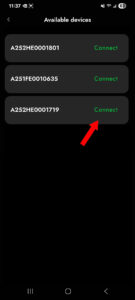
TECH GOD!Official AnswerTo connect a battery on the Norsk Guardian App simply click the green button on the bottom of your dashboard that says ‘ + Add battery’. From there choose the battery number shown on the top of your Norsk Lithium battery and match it up to the number on the generated list shown on the Guardian App.
 Answered by Odin
TECH GOD!
Answered by Odin
TECH GOD!
-
What is the voltage range of my 14.8V portable sonar battery?
Asked by Jessica M. in Illinois
ODIN
TECH GOD!Official AnswerThe voltage range of a 14.8v battery is 12v-16.8v.
Answered by Odin
TECH GOD!
-
What is the voltage range of my 12.8V portable sonar battery?
Asked by Logan B. in North Carolina
ODIN
TECH GOD!Official AnswerThe voltage range of a 12.8v battery is 10v-14.2v.
Answered by Odin
TECH GOD!
-
What is the correct charger for my Norsk 14.8V portable sonar battery?
Asked by Sarah W. in Texas
ODIN
TECH GOD!Official AnswerFor your Norsk 14.8v Portable sonar battery you must use a 16.8v Lithium-Ion Norsk Charger which will be orange as well in correspondence to the battery
For our 14.8v15ah and 14.8v20ah you can only use the 3a 16.8v Norsk Charger
For our 14.8v30ah and 14.8v50ah you can either use the 3a 16.8v Norsk Charger, or if you would like a quicker charge time you can use our 7a 16.8v Rapid Charger
Answered by Odin
TECH GOD!
-
What is the correct charger for my Norsk 12.8V portable sonar battery?
Asked by Blake S. in Pennsylvania
ODIN
TECH GOD!Official AnswerWe only have one option for our GEN-3 12.8V batteries which will be the 14.2v 3a Green Standard LiFePO4 charger.
Answered by Odin
TECH GOD!
-
What is the correct charger for my Norsk 11.1V portable sonar battery?
Asked by Allison M. in South Carolina
ODIN
TECH GOD!Official AnswerFor our Gen-1 and Gen-2 11.1v portable sonar batteries you cannot use the 14.2v 3a Green charger. This is because the previous generations used to be Lithium-Ion, but now our Gen-3 is LiFePO4, we do offer a 2a 12.6v Lithium-Ion battery made specifically for your Gen-1 and Gen-2 11.1v portable sonar batteries.
Answered by Odin
TECH GOD!
-
Can I use the 16.8V 7A Rapid Charger?
Asked by Jennifer O. in Vermont
ODIN
TECH GOD!Official AnswerOnly the 14.8V 30AH & 14.8V 50AH battery models are compatible with the 7A 16.8V Rapid Charger. The 14.8V 15AH & 14.8V 20AH are NOT compatible.
Answered by Odin
TECH GOD!
-
My charger isn’t working.
Asked by Michael R. in Montana
ODIN
TECH GOD!Official AnswerWhen connecting your charger solely to the wall, and then to the wall and battery, if your light is always red, always green, or there is no light at all, please contact our customer support for a replacement charger.
Answered by Odin
TECH GOD!
-
My Portable Sonar charger is getting hot while charging.
Asked by Sean P. in Nebraska
ODIN
TECH GOD!Official AnswerThis is absolutely normal, during the charging process your charger may become warm to the touch. This does not indicate an issue with the battery or charger and will not damage either.
Answered by Odin
TECH GOD!
-
Can I extend the charging leads on my Evo-Tec On-Board Charger?
Asked by Jeffrey A. in West Virginia
ODIN
TECH GOD!Official AnswerWe suggest you avoid extending the charging leads of your Evo-Tec On-Board Charger if possible. Doing so may cause undesirable performance, excessive heat generation due to the increased resistance caused by the longer leads and may significantly shorten your charger’s lifespan.
If your install must have the charging leads extended, please be sure to review our wire gauge chart to ensure the correct gauge wire is used to prevent performance issues & excessive heat generation when charging. Using undersized wire could lead to damage and this would not be covered by the warranty.
Our wire size guide can be found here.
Answered by Odin
TECH GOD!
-
Can I connect my Evo-Tec On-Board Charger to the 28v terminals on my Norsk Lithium 36V 60AH battery?
Asked by Christopher L. in Georgia
ODIN
TECH GOD!Official AnswerNo, never connect your Evo-Tec On-Board Charger to the 28v terminals, only connect the charger to the 36V terminals.
Answered by Odin
TECH GOD!
-
Can my Evo-Tec On-Board Charger be used to charge other battery chemistries besides LiFePO4 lithium?
Asked by Bill D. in North Dakota
ODIN
TECH GOD!Official AnswerOn specific Evo-Tec On-Board Chargers, Bank 1 will have selectable battery chemistry modes: AGM, Lead Acid, and Lithium.
Answered by Odin
TECH GOD!